Kuwait Civil ID Fine Check Online
Checking fines on your Civil ID is easy now. You can do a Civil ID fine check online in just a few minutes.
No office visit needed. Just tap on the “Fine check” button and enter your Civil ID number. You can see your outstanding dues right away, so you can pay before they cause any trouble.
What is a civil ID fine? All types
A Civil ID fine is a penalty charged for breaking PACI or MOI rules. It can happen for many reasons, like a late renewal or an unreported change.
These fines can add up over time. These can affect your travel, banking, and residency status if you don’t pay on time.
Late Card Renewal Fine
This fine applies when you do not renew your card on time. The longer you wait, the more it can grow. Here is how to renew PACI Civil ID.
Failure to Update Address Fine
You must keep your registered address current with PACI. Moving without updating your file can lead to a penalty.
Lost or Damaged Card Fine
Losing or damaging your card must be reported right away. A replacement card comes with its own fee once approved.
Failure to Update Personal Information Fine
Big life changes must be reported too. This includes your marital status, job, or residency details. If you skip a birth or death. This update can also lead to a fine.
Overstay Visa Fine
This one applies to visitors, not residents. If visitors stay after the visa expires, they will be charged a daily fine.
Expired Residency Permit Fine
Expats must renew their residency on time. Missing this deadline results in a fine. This fine increases day by day until it is paid.
Traffic Violation Fine
These fines come from MOI, not PACI. They cover things like speeding, wrong parking, or signal violations. Traffic fine amounts vary by violation type.
How to check civil ID fine online?
It takes just a few minutes to check civil ID fines. You have three official ways to do it, and all of them are free.
PACI Website
Use this method for fines linked to your Civil ID card itself. You can also check Civil ID status via website.
- Visit services.paci.gov.kw.
- Go to Card & Fine Payment.
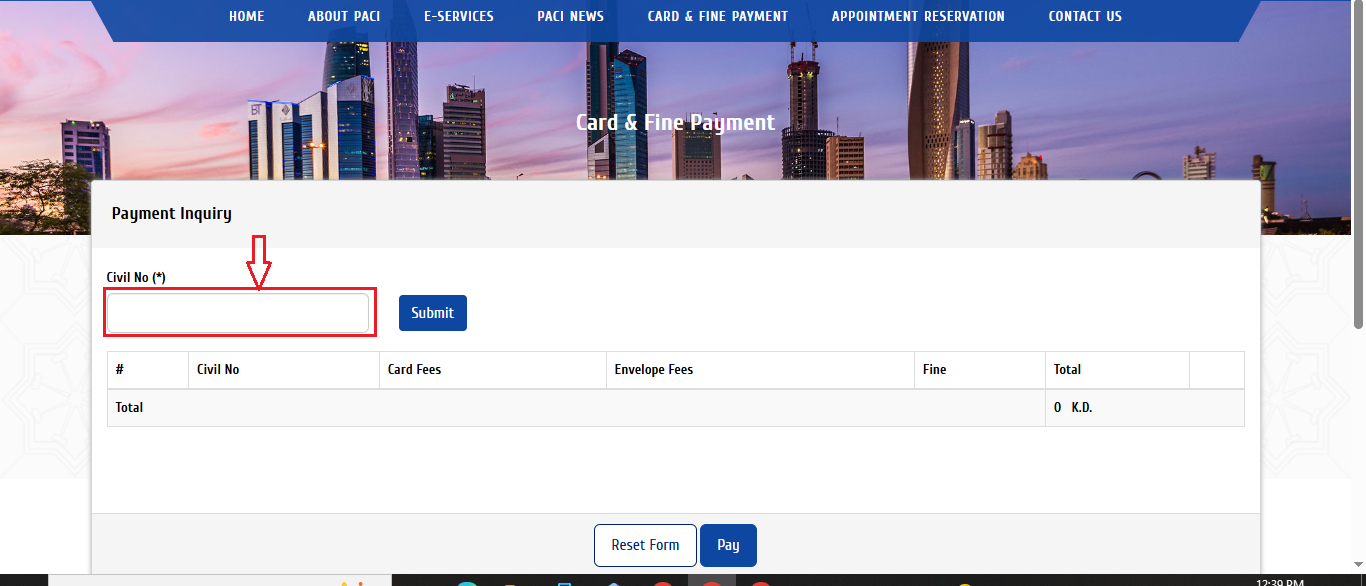
3. Enter your Civil ID number.
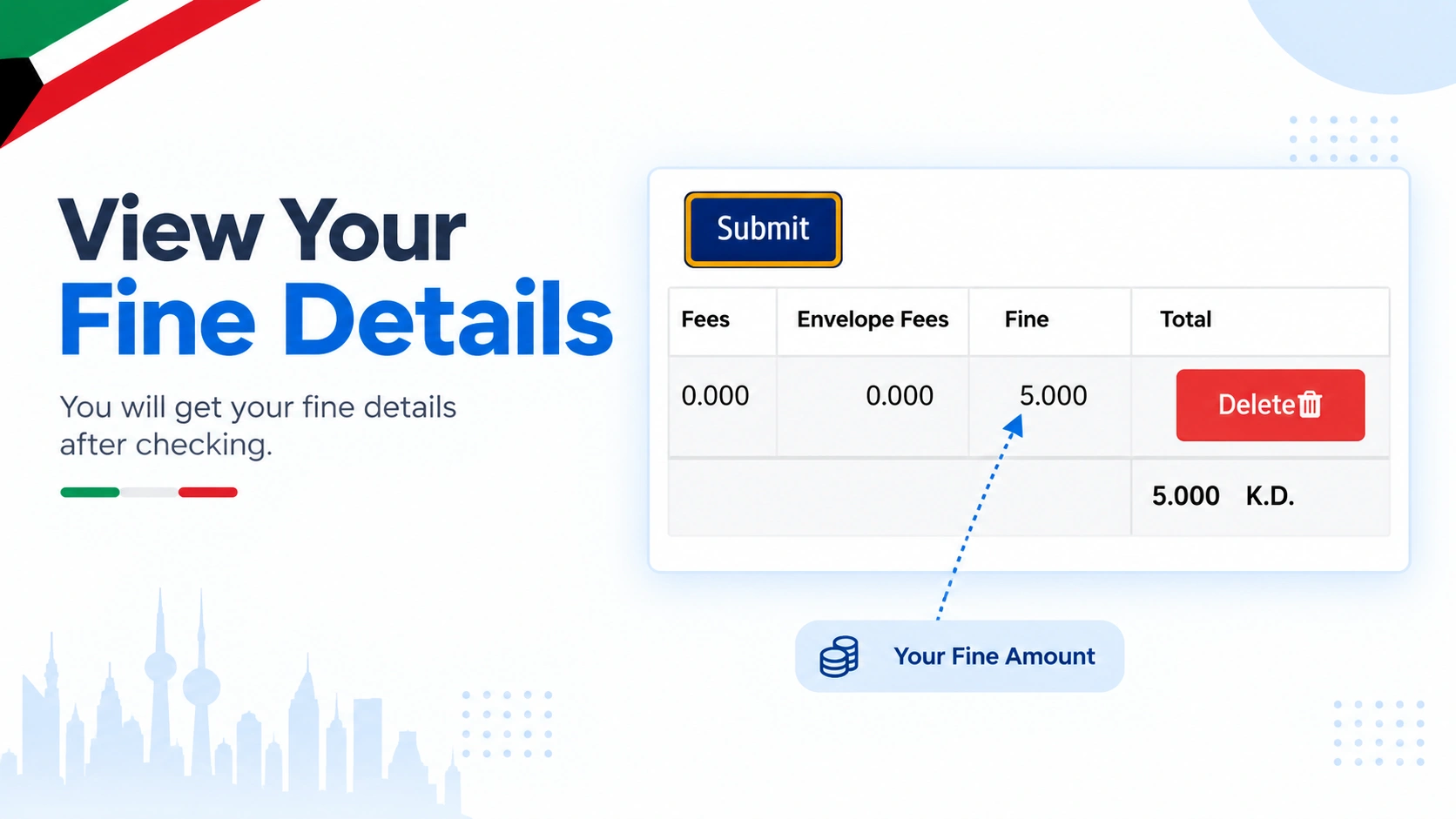
4. Click the Submit button to instantly view your Civil ID fine details.
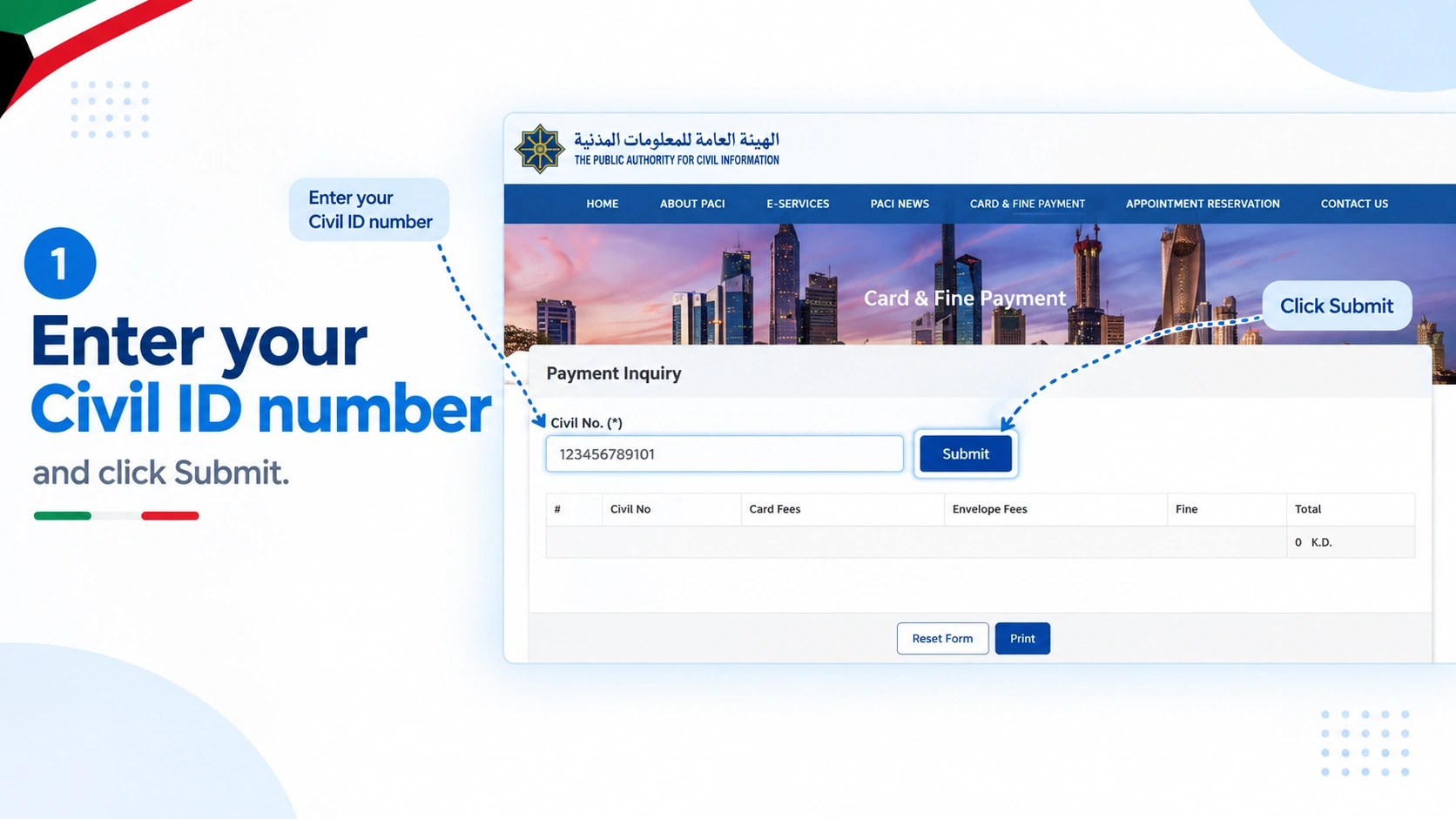
5. Your fine details show up right away.
MOI Website
Use this method for traffic, residency, and visa-related fines.
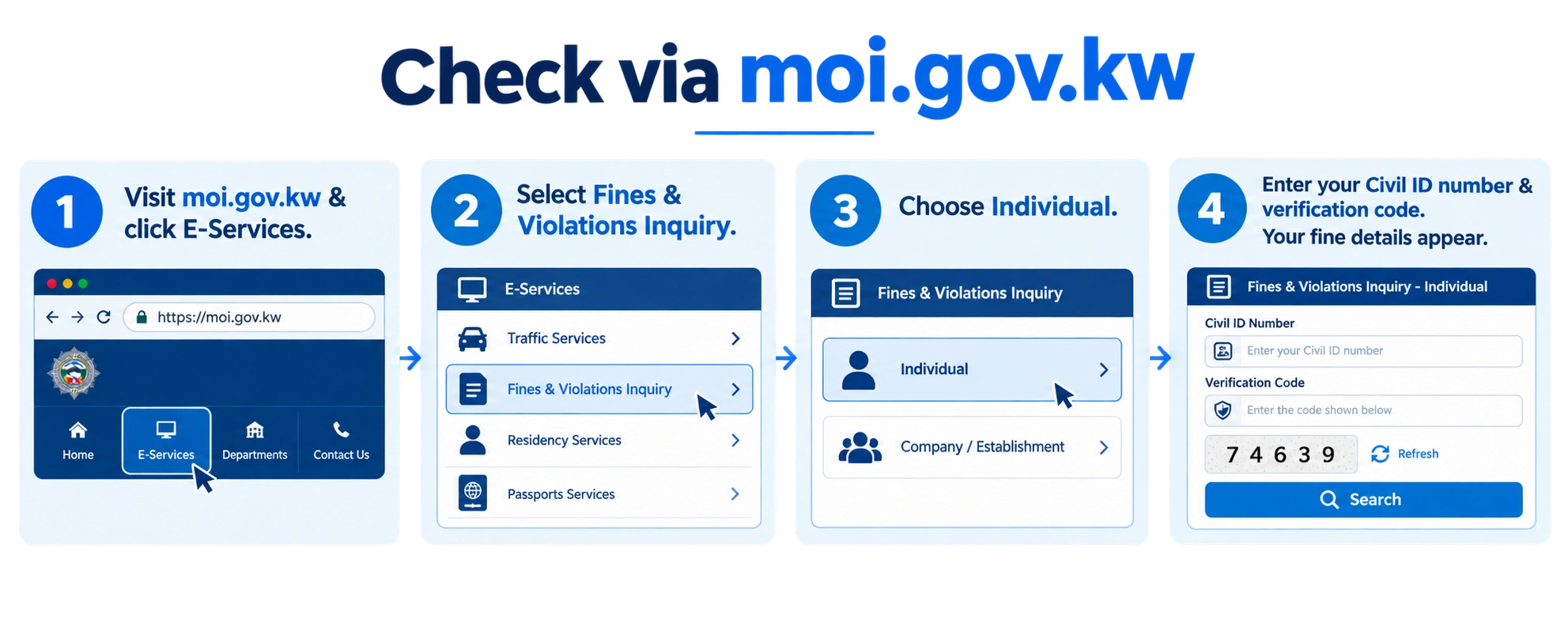
- Visit moi.gov.kw.
- Click on E-Services.
- Select Fines and Violations Inquiry.
- Choose Individual.
- Enter your Civil ID number and verification code.
- Click Enquire.
- Your fine details appear instantly.
Sahel App
This app covers both PACI and MOI fines in one place.
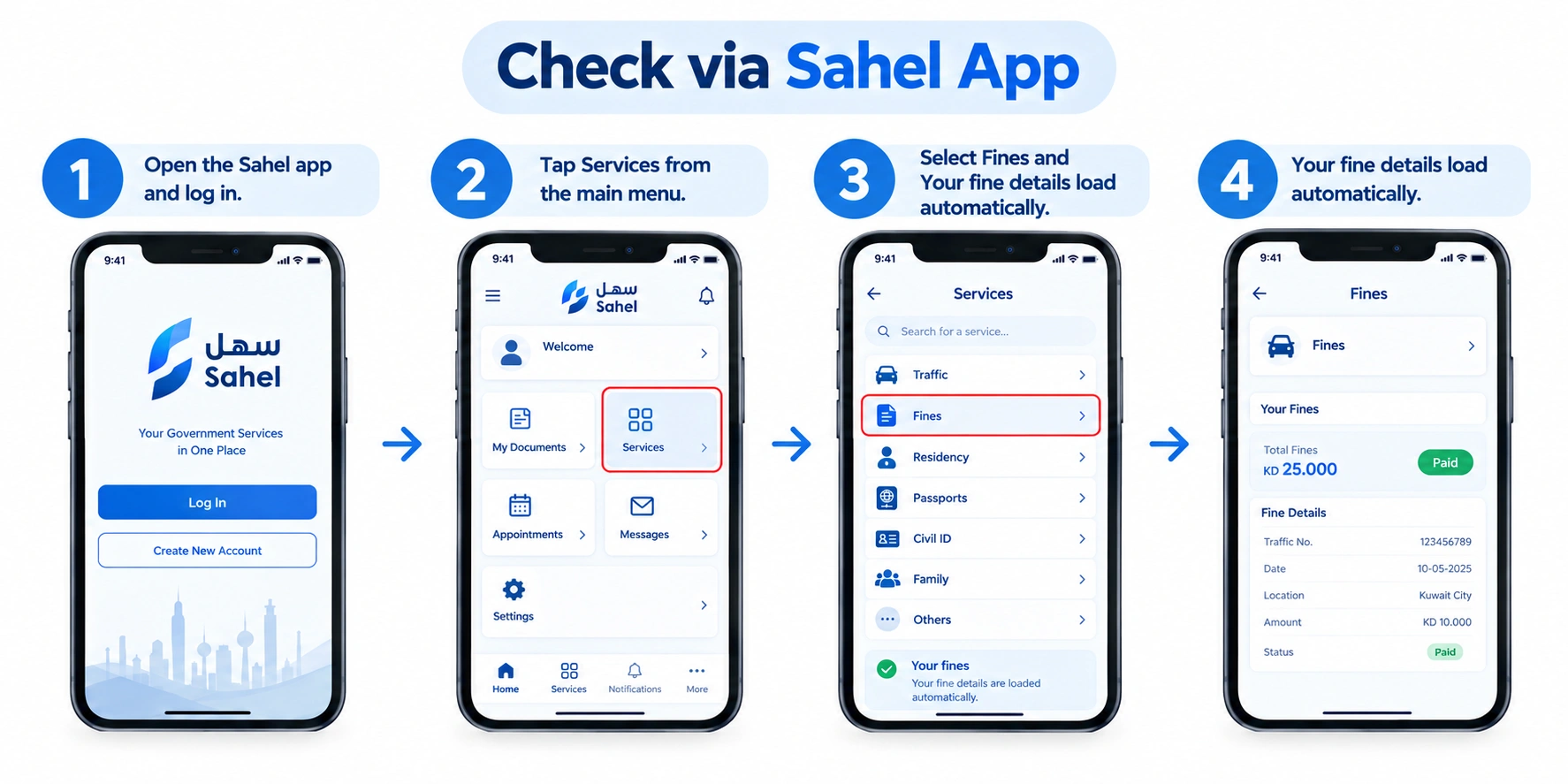
- Open the Sahel app and log in.
- Tap Services from the main menu.
- Select Fines and Violations.
- Your fine details load automatically.
Pick whichever platform matches your fine type, or just use the Sahel app to check everything at once.
Updated Civil ID fine amounts
Here is the updated fine amounts table.
Fine Type | Authority | Amount |
|---|---|---|
Late Renewal | PACI | 20 KWD |
Address Update | PACI | 100 KWD |
Delayed Card Collection | PACI | 20 KWD |
Overstay Fine | MOI | 2 KWD/day (1st month), 4 KWD/day after |
Traffic Violation | MOI | Varies by violation type |
Update Personal Information | PACI | 100 KWD |
Note: Fine amounts can change based on updated government rules. Always confirm your exact amount on the official PACI or MOI website before paying.
How to pay PACI or MOI fines? Complete process
Paying your fines is simple. You have a few easy ways to do it, so pick whichever works best for you.
PACI Website
Follow these steps to pay your fine:
- Visit services.paci.gov.kw.
- Click on Card & Fine Payment.
- Enter your Civil ID number and click Submit.
- Check the amount shown on the screen.
- Click Pay.
- Choose your bank from the list.
- Enter your K-Net card number, expiry date, and PIN.
- Click Submit to finish.
- Click Print to save your receipt.
MOI Website
Use this for traffic and residency fines.
- Visit moi.gov.kw.
- Go to E-Services, then Fines and Violations Inquiry.
- Enter your Civil ID number and click Enquire.
- Select the fines you want to pay.
- Pay through the K-Net gateway.
- Save your confirmation receipt.
Sahel App
Pay both PACI and MOI fines from one app.
- Open Sahel and log in.
- Tap Services.
- For card fines, tap PACI, then Fees and Payment.
- For traffic fines, tap MOI, then Traffic Violations.
- Review the amount and tap Pay.
- Complete payment with K-Net.
- Save your receipt.
PACI Hotline
No internet? You can pay by phone too.
- Dial 1889988.
- Press 2 for English.
- Press 1 for Civil ID services.
- Enter your Civil ID number, then press the star key.
- You’ll get an SMS with a payment link.
- Open the link and pay with K-Net.
- Save the confirmation message.
In Person
Visit the nearest PACI or MOI office if you prefer face-to-face help. Bring your Civil ID and payment card. Pay at the counter and get your receipt right there.
Quick tip: Only K-Net debit cards work for most government payments. Foreign Visa or Mastercard often gets declined. Check this guide about PACI Payment.
Troubleshooting Fine Payment Issues
You may face problems in the fine checking and payment process. Don’t worry, you are not alone; I have provided solutions in detail.
Payment Not Going Through
Your K-Net payment might fail on the first try. Check your card details and internet connection, then try again.
Foreign Cards Not Accepted
Many foreign Visa or Mastercard cards don’t work on government portals. Use a local K-Net debit card instead.
Fine Still Showing After Payment
Sometimes the system takes time to update. Wait 15 to 30 minutes before checking again. Don’t pay the same fine twice.
Wrong Civil ID Number Entered
A single wrong digit shows no results or an error. Double-check your number before hitting submit.
Fine Not Showing But You Know It Exists
Some fines take a few days to appear in the system. Check again after 24 to 48 hours, or try a different platform like Sahel.
Trouble Understanding the Fine Type
Not sure if it’s a PACI fine or MOI fine? Check the label on your result. PACI covers Civil ID issues. MOI covers traffic and residency.
Also Check: What if your Kuwait Civil ID lost.
Frequently Asked Questions
How do I do a Kuwait Civil ID check for fines?
Visit the PACI or MOI website. Enter your Civil ID number, and your fine details show up right away.
What is the fastest way to do a civil ID fine check?
The Sahel app is the quickest option. It shows both PACI and MOI fines in one place, without switching sites.
How can I complete civil ID fine payment online?
Use the PACI or MOI website, or the Sahel app. Enter your details and pay through K-Net in just a few steps.
Can I check fines without visiting an office?
Yes. You can check and pay everything online, by phone, or through the Sahel app. No office visit is needed.
What happens if I don’t pay my fine on time?
Unpaid fines can block your residency renewal and travel. They may also lead to further legal trouble the longer they sit unpaid.
Final words
Check your civil ID fine and pay on time to avoid daily fines. It is a simple and easy process. No need for an office visit; you can pay any type of fine online. Follow the instructions for a smooth civil ID fine check and online payment.